




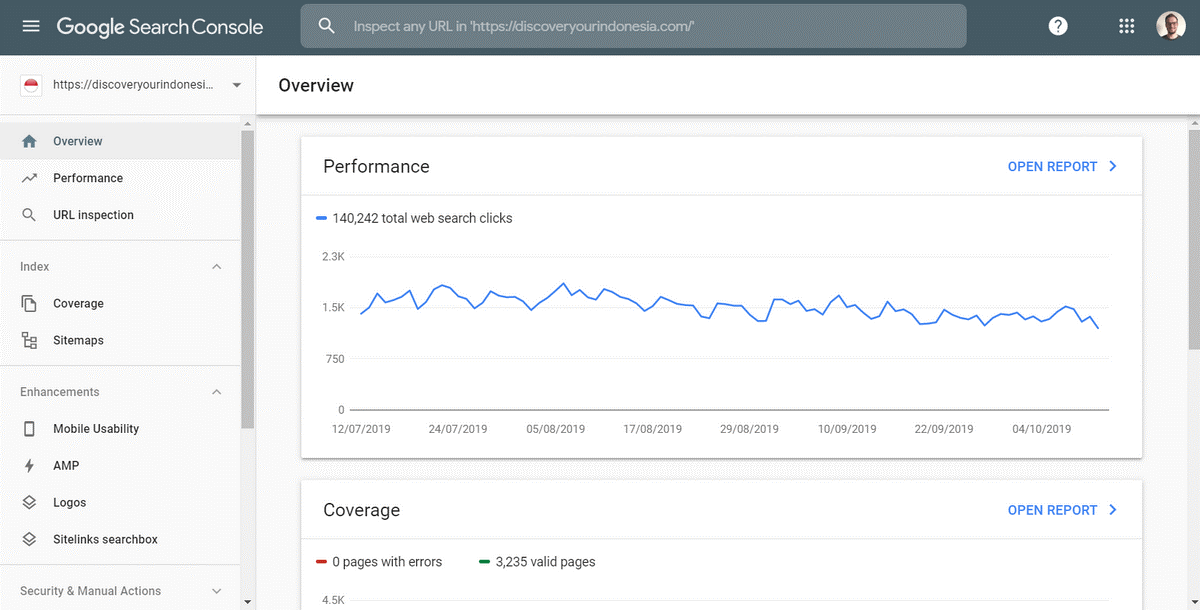
If there is one thing you can be absolutely certain about when running a website, it is that Google Search Console is the most underutilised tool in your SEO stack. It holds the exact blueprint of how Google sees your site, but most people only check it when they panic about a traffic drop.
According to Google’s official Search Console documentation, the performance report provides the only first-party data on impressions, clicks, and average position. In fact, a case study by Search Engine Journal revealed that users who integrated Search Console data to actively prioritise fixes experienced an average increase in traffic of 15% over the course of one year.
When a website has dozens of technical issues and hundreds of underperforming pages, you cannot fix them all at once. You need to use Search Console data to prioritise the fixes that will move the needle the fastest.
Here is how to turn raw Search Console data into a prioritised SEO action plan:
Comparing Performance Across Matching Periods
The first thing to realize is that looking at the last 28 days in isolation tells you very little about whether your site is actually improving.
Search Console’s period comparison feature is the most powerful tool for identifying momentum. By comparing the last 28 days against the previous 28 days, you can see if your recent SEO efforts are actually working.
More importantly, you should compare the last 28 days against the same period last year. This removes the noise of seasonal fluctuations. If you run an e-commerce site, comparing December 2025 to November 2025 will show a massive drop, but comparing December 2025 to December 2024 will tell you the truth.
The general gist is that if your impressions are going up but your clicks are flat, you have an issue with your average position or click-through rate.
Identifying High-Impact Page Losses
While overall traffic trends are useful, they hide the specific pages that are bleeding out.
To find these, export your Performance report and filter for pages where clicks have dropped significantly between two periods. You are looking for pages that used to drive consistent traffic but have suddenly fallen off a cliff.
Often, these drops are caused by technical issues rather than content decay. A page might have accidentally been given a noindex tag during a site migration, or a core template update might have broken the internal linking structure pointing to it.
If you or a previous SEO agency recently ran a site migration or a major redesign, identifying these specific page losses is the most urgent SEO task on your list.
Estimating Opportunity From Search Impressions
Not all traffic drops are the end of the world; sometimes, they are just missed opportunities.
When you look at the Queries tab in Search Console, you will inevitably find keywords where your site is getting a massive number of impressions but zero clicks. This usually happens when you rank on page two or at the very bottom of page one.
The opportunity here is incredibly high. Moving a page from position 11 to position 8, or from position 4 to position 1, can result in a massive spike in traffic.
Estimate the opportunity by taking the total impressions for that query and applying the average click-through rate for the position you want to reach. If a query gets 50,000 impressions a month and you move to position 3, you are looking at a potential gain of thousands of new visitors.
Prioritising Indexing Issues by Search Impact
It is easy to get distracted by the hundreds of warnings and errors in Google Search Console, but not all of them matter.
According to the Google Search Central Blog, Google’s indexing systems process hundreds of billions of pages. Not every “Discovered – currently not indexed” or “Crawled – currently not indexed” page is a crisis.
To prioritise these issues, you must cross-reference the errors with your traffic data. A 404 error on a high-traffic cornerstone blog post is an emergency. A soft 404 error on a dynamic product filter page that receives zero traffic can wait.
In a verified case study published by Search Engine Land, a multinational media organization lost 90% of its organic traffic following a domain migration because of unaddressed soft 404 errors. Their crawl requests dropped from 60,000 per day to 20,000 per day, and they had over 513,000 pages sitting in the “Crawled – currently not indexed” bucket.
When they finally prioritised fixing those specific indexing bottlenecks, they began to unlock suppressed traffic potential across 13 country-specific domains.
Validating Fixes With Fresh Data
Pruning your site is not a one-and-done task; it requires monitoring to prove it worked.
After you have implemented your SEO fixes, you need to wait for Google to recrawl and reindex the affected pages. This can take anywhere from a few days to a few weeks, depending on your site’s overall authority.
Return to the Performance report in Search Console and use the period comparison feature again. Compare the 28 days since the fix against the 28 days prior to the fix.
If you fixed a noindex issue, you should see the impressions for that specific page return. If you optimised a page’s meta description to improve click-through rate, you should see the CTR increase even if the average position remains exactly the same.
Common Challenges For Search Console Prioritisation While Search Console is the ultimate source of truth, relying on it entirely for prioritisation is not a faultless strategy. There are a couple of common problems that many people face:
Firstly, Search Console data is notoriously sampled and delayed. It only shows up to 1,000 rows of data per query, and the data can be up to three days old. If you are running a massive site with millions of queries, you will not see the full picture, making it difficult to prioritise long-tail keyword opportunities accurately.
Secondly, you are often left at the mercy of how Google reports errors. The “Excluded” tab is filled with things that you actually want to be excluded, like duplicate pages or parameterised URLs. Sorting through the noise to find the actual errors that are hurting your traffic requires a deep understanding of how Google categorises pages.
Conclusion: Turning Data Into Action
Search Console data is only as useful as the actions you take based on it.
By comparing performance across matching periods, identifying high-impact page losses, estimating the opportunity from search impressions, and prioritising indexing issues by their actual search impact, you can build a prioritised to-do list that actually drives revenue.
Just remember to validate your fixes with fresh data afterward, and do not get bogged down in fixing errors on pages that nobody visits. Turning raw data into prioritised SEO fixes makes way for the sustainable traffic growth that actually drives your business forward.